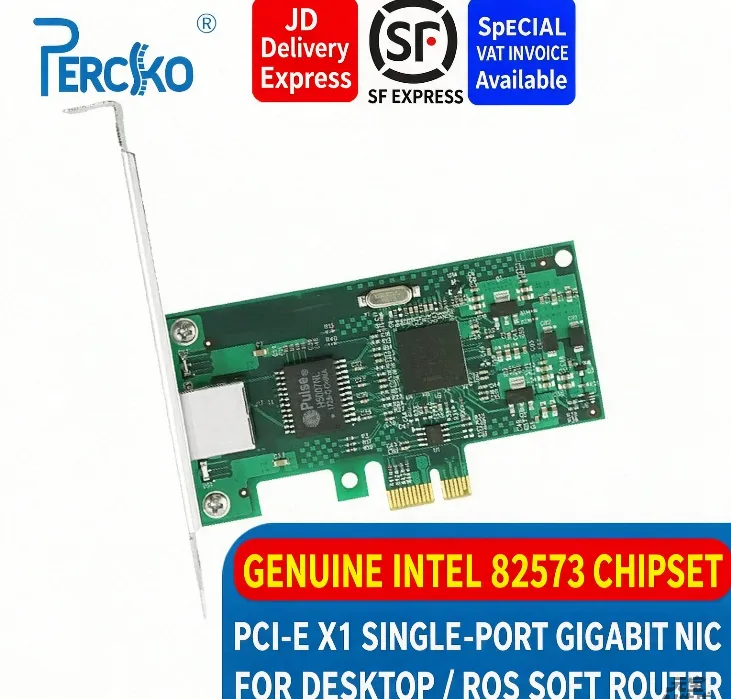

Let’s be honest — nobody gets excited about a network card. You buy one because something broke, or because you’re building a router out of a PC you found in a closet, and you just want the thing to work. And yet here I am, writing a whole post about a chip that Intel launched back in 2005 and officially discontinued in 2016. So why bother? Because if you’ve been shopping for a cheap single-port gigabit NIC, you’ve almost certainly seen “Intel 82573” in the listing, and you’ve probably wondered whether it’s actually any good, or whether it’s just old. Short answer: it’s old. It’s also genuinely good.
The 82573 is a single-chip gigabit Ethernet controller. Intel packed both the MAC and the PHY onto one die, which back then was a pretty big deal, because it means the card doesn’t need a separate PHY chip hogging board space. The whole chip is 15 by 15 millimeters, roughly the size of your thumbnail, and that’s part of why these cards are so cheap and so small.
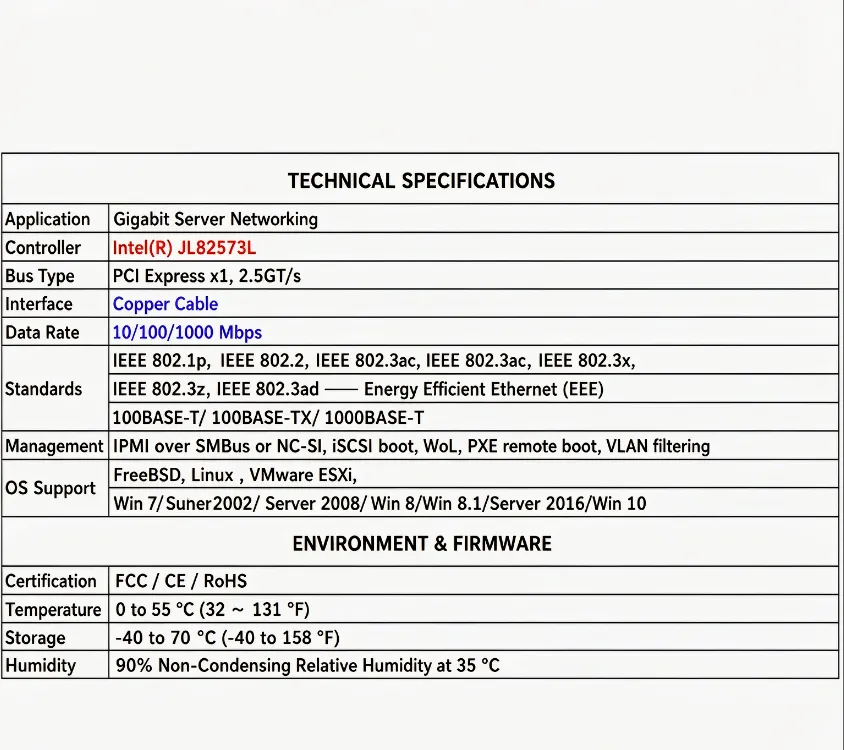
It talks to your motherboard over PCI Express x1, revision 1.0a. Now, “revision 1.0a” sounds ancient, and well, it is. But here’s the thing: a single Gen1 lane gives you roughly 2 Gb/s in each direction, while a gigabit connection running full duplex needs 1 Gb/s each way. So you have headroom. Nobody is bottlenecking a 1G link on a PCIe x1 slot. And because it’s an x1 card, you can drop it into an x4, x8, or x16 slot and it’ll work just fine — the little card sitting in a big slot looks a bit funny, but it works.
The family has three members, and the differences are mostly about features you probably don’t need.
The 82573E is the fancy one with Intel AMT for remote management. The 82573V swaps that for ASF 2.0 alerting. Then there’s the 82573L, the low-power one, and the one you’ll actually find on most consumer cards.
The L is the interesting one for us. At a full 1000 Mbps link it sips about 1.2 watts, and when there’s no cable plugged in at all it drops to around 53 milliwatts. That’s nothing. If you’re building a fanless little router that’s going to sit in a corner for five years, that number matters more than any benchmark.
Here’s the real reason people keep buying these, and it isn’t the specs. It’s the drivers. The 82573 is supported by Intel’s e1000e driver, which has been in the Linux kernel forever. You install pfSense, OPNsense, OpenWrt, Debian, Proxmox, whatever, and the card just shows up. No hunting for a driver disc from 2009, no roulette where you’re never quite sure which revision of the chip you got or which driver version actually works with it. RouterOS, pfSense, OPNsense — they all just see it. Plug it in, boot, done.
It also has the features you’d actually want in a router or a small server. There’s VLAN support on 802.1q with up to 4096 tags, so you can segment your network without buying managed-switch magic. There’s checksum offloading for IP, TCP and UDP, plus TCP segmentation, which shifts work off your CPU — a big deal if your “server” is a decade-old Celeron. There’s PXE boot, so you can boot a machine off the network, which is great for homelab tinkering. There’s Wake-on-LAN, so you can wake a sleeping machine remotely. And there’s 32 KB of on-chip buffer with hardware interrupt throttling, which is a fancy way of saying it doesn’t melt your CPU when traffic gets busy.
Now the honest downsides, because there are some. It’s genuinely old — Intel marked it end-of-life years ago, so you’re not buying cutting-edge here, you’re buying mature. For a gigabit NIC, mature mostly means boring and reliable, which is fine, but don’t expect 2.5G or 10G. It also doesn’t do jumbo frames; Intel’s own spec sheet lists jumbo frames as not supported, so if your plan involves iSCSI or a storage network where a 9000-byte MTU actually matters, this isn’t your card. For normal internet traffic you won’t notice.
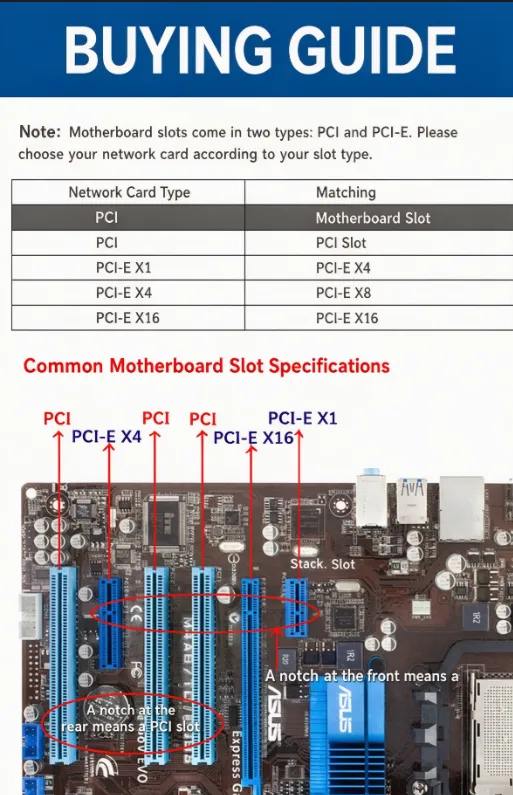
The market is also full of pulls. Because these chips have been around so long, a lot of cards out there are built with pulled or relabeled silicon. This is the one place I’d say buy from somewhere that’ll actually take a return, because a suspiciously cheap card with a slightly-too-shiny chip is a coin flip. And check your slot before you order — this is a PCIe card, it will not go into an old-school PCI slot. They look similar enough that people get this wrong constantly: PCI slots have the notch toward the back, PCIe toward the front. Ten seconds of looking saves you a return.
So who should actually buy one? Buy it if you’re building a pfSense, OPNsense or RouterOS box and just want it to work on the first boot. Buy it if you’re reviving an old desktop whose onboard port died. Buy it if you need a cheap, low-power, fanless-friendly gigabit port, or if you want VLANs without paying for them. Skip it if you have a 2.5G or 10G network, because obviously you should get a modern multi-gig card instead. Skip it if you need jumbo frames. And skip it if you want something with an active warranty and a long future ahead of it.
There’s a specific kind of joy in hardware that just does its job for twenty years. The 82573 isn’t fast, it isn’t new, and it isn’t sexy. But you plug it in, the driver’s already there, the link comes up at 1000 Mbps, and it stays up. For a lot of us, that’s worth more than a spec sheet full of numbers we’ll never use. Sometimes the best hardware is the hardware you never think about again.